SOMA vs Bevel: 7 differences that matter
Bevel is the broader, more established app: free recovery, sleep and strain scores, a detailed food logger, free cycle tracking and a paid AI chat coach. SOMA is narrower and built for women: it reads Apple Health, Apple Watch, Oura and Whoop and returns one plan a day, a rule-based call on how hard to train with its reason, plus an AI-generated session and meal ideas. Pick Bevel to track and analyze everything; pick SOMA if you want the day decided for you.
SOMA Team · · 9 min read
( In short )
- Bevel reads more sources (Apple Health, Oura, Garmin, Google Health, CGMs, lab results); SOMA reads Apple Health, Apple Watch, Oura and Whoop.
- Bevel gives you scores and a target strain; SOMA gives you one rule-based call (Rest to Push Hard) with the reason attached.
- Bevel has the deeper food logger and a chat coach (Pro); SOMA has no chat but sizes a recipe from your fridge to the macros you have left.
- Bevel has a free tier and Pro at $14.99/month or $99.99/year; SOMA has a limited free plan, with Premium at $19.99/month or $155.99/year.
- Both run on iPhone; Bevel also has an Apple Watch app. Neither has an Android app today.
How do SOMA and Bevel compare at a glance?
Both are iPhone apps that turn wearable data into daily guidance, and both use AI. The difference is scope. Bevel is a broad tracking platform with a free tier and an optional paid AI coach. SOMA is a single paid plan whose job is to tell you what to do today, for training and for food. The table covers the seven points that matter most when choosing; each one gets its own section below.
| SOMA | Bevel | |
|---|---|---|
| 1. Data sources | Apple Health (including Apple Watch), plus direct Oura and Whoop connections | Apple Health and Apple Watch; direct Oura, Garmin Connect and Google Health; CGMs via Apple Health; lab results (Pro). No direct Whoop integration listed |
| 2. “How hard today?” | One rule-based call: Rest, Light Movement, Moderate or Push Hard, with the reason and the numbers behind it | Recovery score plus a Target Strain based on recent recovery; Bevel Intelligence (Pro) suggests when to train or rest |
| 3. Workout plans | AI-generated daily session from your profile, recovery and equipment; gym scan rebuilds it around the room you photograph | Strength Builder (700+ exercises) on iPhone and Watch; free AI routines; multi-week plans via Bevel Intelligence (Pro). Equipment-aware generation: not stated |
| 4. Nutrition | Calorie and macro targets; log by typing or dictating (AI estimate, you review); one recipe from your fridge sized to what’s left today. No barcode scanner | Barcode, photo, text and a 6M+ food database; calorie, macro and nutrient goals; Nutrition Score; glucose with a CGM. Meal plans via Bevel Intelligence (Pro) |
| 5. AI coach / chat | No chat. Two AI agents write the workout and meal ideas | Bevel Intelligence chat (Pro): questions, check-ins, memory, plans. Weekly allowance; extra credit packs $4.99–$49.99 |
| 6. Women / cycle | Designed for women; optional period date and cycle length adjust training; optional pregnancy week adjusts workouts. Not a cycle tracker | Free Cycle Tracking: flow and symptom logs, period and phase predictions, recovery patterns by phase |
| 7. Price & platforms | Limited free plan; Premium $19.99/month (no trial) or $155.99/year (3-day free trial). iPhone, iOS 17+. No Watch app; Android on the roadmap | Free tier; Pro $14.99/month or $99.99/year, trial varies. iPhone, iOS 18+, plus Apple Watch app. No Android app listed |
Which wearables and data sources do SOMA and Bevel read?
SOMA uses Apple Health as its hub, which covers Apple Watch, and connects directly to Oura and Whoop. From Apple Health it reads sleep, HRV, resting heart rate, heart rate, steps, active energy and exercise time; from Whoop, recovery, strain and sleep; from Oura, readiness, sleep and stress. Garmin, Fitbit, Polar, Samsung Health, Withings and Strava are in progress, not live. SOMA does not read continuous glucose monitors or smart scales.
Bevel reads more. Its help center lists full Apple Health and Apple Watch integration plus direct integrations with Oura, Garmin Connect and Google Health, which also carries Fitbit data, and a one-way push of workouts to Strava (Bevel). It reads Dexcom, FreeStyle Libre and other CGMs through Apple Health (Bevel), and Pro members can import lab results and clinical records (Bevel). Whoop is not on Bevel’s list of direct integrations; Bevel’s FAQ says it works with any device that writes its data to Apple Health (Bevel).
In short: if you wear a Garmin or a CGM, or want bloodwork in the same app, Bevel covers it and SOMA does not. If you wear a Whoop, SOMA reads it directly. Still choosing a wearable? Start with Apple Watch vs Oura vs Whoop.
Which app tells you how hard to train today, and why?
Bevel gives you scores to read. Its Recovery Score weighs signals such as HRV and resting heart rate recorded during sleep, and its Target Strain suggests a higher or lower effort than your baseline depending on how well you have recovered in recent days (Bevel FAQ). Metrics are labeled above, within or below your personal 60-day baseline (Bevel). With Pro, Bevel Intelligence also suggests when to train and when to rest (App Store).
SOMA gives you a decision. Each morning the home card says Rest, Light Movement, Moderate or Push Hard, with a duration and a one-line reason, for example that Apple Health signals point to you still recovering. “Why this?” shows the numbers behind it. That daily call is chosen by a fixed set of rules and involves no AI, as our privacy policy states; AI only writes the session itself.
Neither approach is better in the abstract. Scores suit people who enjoy interpreting their own data; a single call suits people who want the interpretation done for them. If you want to read a low recovery day yourself, see Low HRV: should you work out today?
Do SOMA and Bevel build your workouts?
Both do, in different ways. Bevel’s Strength Builder logs lifts on iPhone and Apple Watch from a library of 700+ exercises, and generating workout Routines is included in the free tier (Bevel). Multi-week Training Plans, such as a 16-week triathlon block, are created through Bevel Intelligence, so they need Pro (Bevel). Bevel does not state whether generated workouts adapt to the equipment you have, and its Strength Builder FAQ notes that custom equipment types are not available yet (Bevel).
SOMA writes the day’s session with AI from your goals, experience, noted injuries, recovery and equipment, laid out in blocks with sets, reps and target effort. Gym scan lets you photograph the room you are in, and the session is rebuilt around the equipment that is actually there; the photo is used for recognition and not stored. That is the situation covered in how to build a workout with only the equipment you have.
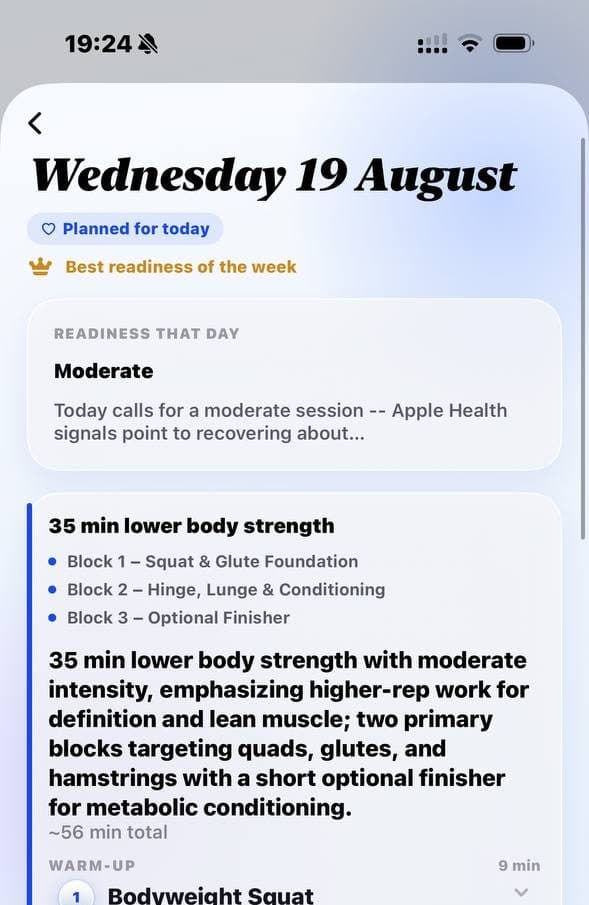
Where Bevel is stronger: logging lifts from your wrist, personal records, muscular load and long training blocks. SOMA has no Apple Watch app of its own; your watch still records workouts into Apple Health, which SOMA reads.

How do SOMA and Bevel handle nutrition?
Bevel is the deeper food tracker. You can log by barcode, photo, camera-roll import, a typed description or a search of its database of 6 million+ foods, set calorie, macro and nutrient goals, and get a Nutrition Score (Bevel, App Store). With a CGM it shows glucose alongside your meals. Bevel Intelligence (Pro) adds fridge-based meal ideas, weekly meal plans and shopping lists (Bevel).
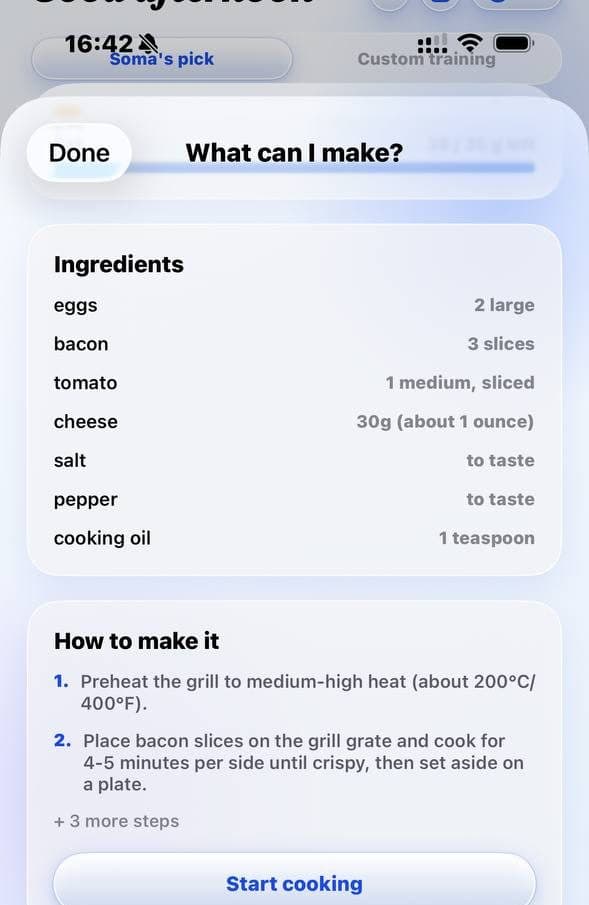
SOMA covers less ground but ties food to the day’s plan. It sets daily calorie and macro targets from your weight, height, activity and goal. You log a meal by typing or dictating it; AI estimates calories and macros, and you review them before saving. There is no barcode scanner. Ask “What can I make?”, list what is in your fridge, and SOMA returns one recipe sized to the calories and macros you have left today, shows how it fits, walks you through it and logs it. More on that in high-protein meals from what’s in your fridge.
Can you chat with an AI coach in SOMA or Bevel?
In Bevel, yes, with Pro. Bevel Intelligence answers questions about your data, runs scheduled check-ins, remembers goals and injuries, builds training and meal plans and can read uploaded lab results (Bevel). Pro includes a weekly usage allowance that resets every 7 days (Bevel); beyond it, credit packs on the App Store run from $4.99 for 350 credits to $49.99 for 4,200 (Bevel, App Store).
SOMA has no chat. Two AI agents, a fitness coach and a nutrition expert, write the session and the meal ideas, and the reasoning appears on the plan itself. If you like asking open-ended questions about your sleep or training, Bevel does that and SOMA does not. If you would rather not write prompts every morning, SOMA’s fixed daily format is the alternative. The same trade-off applies to the assistants built into wearables; see our Whoop Coach alternative and Oura Advisor alternative pages.
Which app is built for women, and which is cycle-aware?
Bevel has the fuller cycle feature, and it is free. Cycle Tracking logs flow, symptoms and contraception, predicts periods from up to six past cycles, estimates the ovulatory phase from temperature shifts, and shows your typical recovery pattern in each phase (Bevel, Bevel). Bevel’s own guidance on cycle syncing is measured: effects are often modest and vary widely between people, so train by your own experience and symptoms (Bevel).
SOMA is designed around women’s training and nutrition from the start rather than adapted from a general-purpose app, but it is not a cycle tracker. If you choose, you enter the start date of your last period and your typical cycle length, and SOMA uses them to adjust training guidance, worded as “may” because the evidence for performance effects is weak. You can also tell it you are pregnant and which week, and the workouts it generates adjust to that stage. Both inputs are optional and can be cleared at any time.
Neither app is a fertility or contraception tool, and both say so.
How much do SOMA and Bevel cost, and where do they run?
Bevel is cheaper and has a free tier. Free includes Recovery, Sleep, Strain, Stress, Energy Bank, nutrition tracking, Strength Builder, cycle tracking and the Apple Watch app. Pro adds Bevel Intelligence, Health Records, Biological Age and Training Plans, as a subscription at $14.99/month or $99.99/year in the US; trial availability varies (Bevel). The app needs iOS 18 or later and includes an Apple Watch app (App Store); bevel.health offers an iOS download only (Bevel).
SOMA is a free download with a limited free plan; Premium unlocks the full daily plan (workouts, step targets and more) at $19.99/month with no trial, or $155.99/year with a 3-day free trial on the yearly plan only. Both renew automatically and can be cancelled any time (SOMA pricing). It runs on iPhone with iOS 17 or later, has no Apple Watch app, and Android is on the roadmap.
Maturity is a real difference too. Bevel has been on the App Store since January 2024 and shows 4.8 stars from about 16,600 US ratings (App Store). SOMA launched on 28 September 2026 and has no App Store ratings yet (App Store).
Who should pick Bevel, and who should pick SOMA?
Pick Bevel if…
- You want a free app that scores recovery, sleep, strain and stress from your Apple Watch.
- You log food in detail: barcodes, photos, micronutrients, or glucose from a CGM.
- You wear a Garmin or Fitbit, or want lab results in the same place.
- You want to ask an AI questions about your own data.
- You log lifts on your wrist and care about personal records and muscular load.
Pick SOMA if…
- You want one answer each morning, with its reason, rather than scores to interpret.
- You wear a Whoop or Oura and want your plan to read it directly.
- You train in different gyms and want the session rebuilt around the equipment in front of you.
- You want meal ideas from your fridge, sized to the macros you have left today.
- You want an app designed around women’s training, with optional cycle and pregnancy inputs.
Some people will use both: Bevel for tracking, SOMA for the daily plan. Both read Apple Health, so one does not block the other. To see how they sit next to Athlytic, Gentler Streak, Welltory, WHOOP Coach and Oura Advisor, read the best AI fitness coach apps for Apple Watch, Oura and Whoop owners, or see how SOMA works.
Questions people ask
Is Bevel free?
Bevel has a free tier that includes recovery, sleep, strain and stress scores, nutrition tracking, Strength Builder, cycle tracking and the Apple Watch app. Bevel Pro, which adds the Bevel Intelligence chat coach, Health Records, Biological Age and Training Plans, costs $14.99/month or $99.99/year in the US as of October 2026.
Does Bevel work with Whoop?
Whoop is not on Bevel’s list of direct integrations. Bevel’s FAQ says it works with any device that writes its data to Apple Health, so Whoop data reaches Bevel only to the extent Whoop shares it with Apple Health. SOMA connects to Whoop directly.
Does SOMA have a free version?
Yes, a limited one. SOMA is a free download with a free plan; Premium unlocks the full daily plan — workouts, step targets and more — at $19.99/month, or $155.99/year with a 3-day free trial on the yearly plan only. The monthly plan has no trial.
Can I use SOMA and Bevel together?
Yes. Both read Apple Health, so you can track metrics and food in Bevel and take your daily training and meal plan from SOMA. Each app asks for its own Health permissions.
Are SOMA or Bevel available on Android?
Not as of October 2026. SOMA runs on iPhone with iOS 17 or later, with Android on the roadmap. Bevel runs on iPhone with iOS 18 or later and on Apple Watch, and its website offers an iOS download only.
Sources
- Bevel: AI Health Coach (App Store listing) — Apple App Store
- Bevel – The Connected Health Coach — Bevel
- Bevel Membership & Pricing — Bevel Knowledge Base
- How To Connect Devices — Bevel Knowledge Base
- How to Connect a CGM — Bevel Knowledge Base
- Frequently Asked Questions — Bevel Docs
- Common Questions — Bevel Knowledge Base
- Bevel Intelligence Capabilities — Bevel Knowledge Base
- How to Purchase Additional Bevel Intelligence Credits — Bevel Knowledge Base
- How to Build a Training Plan — Bevel Knowledge Base
- Strength Builder Common Questions — Bevel Knowledge Base
- How to Log Food — Bevel Knowledge Base
- Cycle Common Questions — Bevel Knowledge Base
- Understanding Recovery and Your Cycle — Bevel Knowledge Base
- Soma Health (App Store listing) — Apple App Store
- Pricing — SOMA — SOMA
General wellness information, not medical advice. If something feels off — persistent fatigue, illness, pregnancy, an injury — talk to a clinician before changing how you train or eat.
Keep reading

October 1, 2026 · 10 min read
Best AI fitness coach apps for Apple Watch, Oura and Whoop owners (2026)
Seven AI fitness coach apps for Apple Watch, Oura and Whoop owners compared on data, daily guidance, workouts, nutrition, AI chat, cycle features and price.

October 1, 2026 · 10 min read
Apple Watch vs Oura vs Whoop for recovery-based training
Apple Watch, Oura Ring or Whoop for training by recovery? We compare HRV, sleep, workouts, battery, cost and phone support, and whether you need two at once.

October 1, 2026 · 6 min read
Low HRV: should you work out today?
A low HRV reading doesn’t automatically mean rest. How to read it against your baseline, what Whoop red and low Oura readiness mean, and how to adjust today.
October 1, 2026 · 6 min read
How to build a workout with only the equipment you have
Hotel gym, dumbbells at home or just a park: build a full-body session from five movement patterns, smart substitutions and simple progression. Three templates.
October 1, 2026 · 5 min read
What to eat after a workout: high-protein meals from what’s in your fridge
How much protein to eat after training, why the 30-minute window is mostly a myth, and five high-protein meals from fridge staples, with approximate macros.